Case study · Alinkeo · 2022–23

Learning, pinned to the moment

A video learning platform for Elgia, where every note, comment, question and pin attaches to a line of the lesson's transcript

Role
Senior product designer, alongside junior designer Mutala Musau
Team
Jude Otenyo, lead developer
Mutala Musau, junior designer
Timeline
2022–23
Platform
Web · desktop and mobile
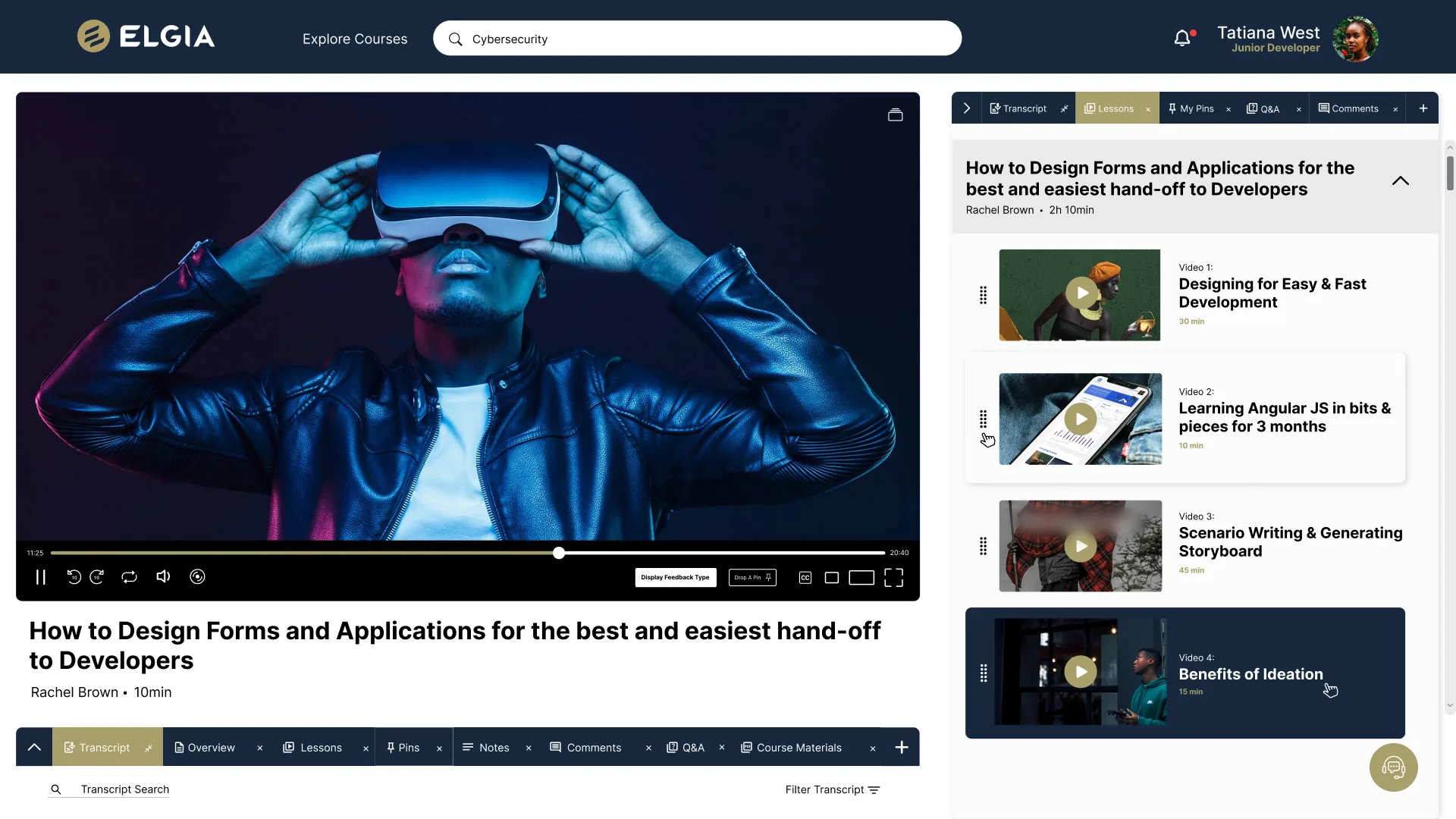
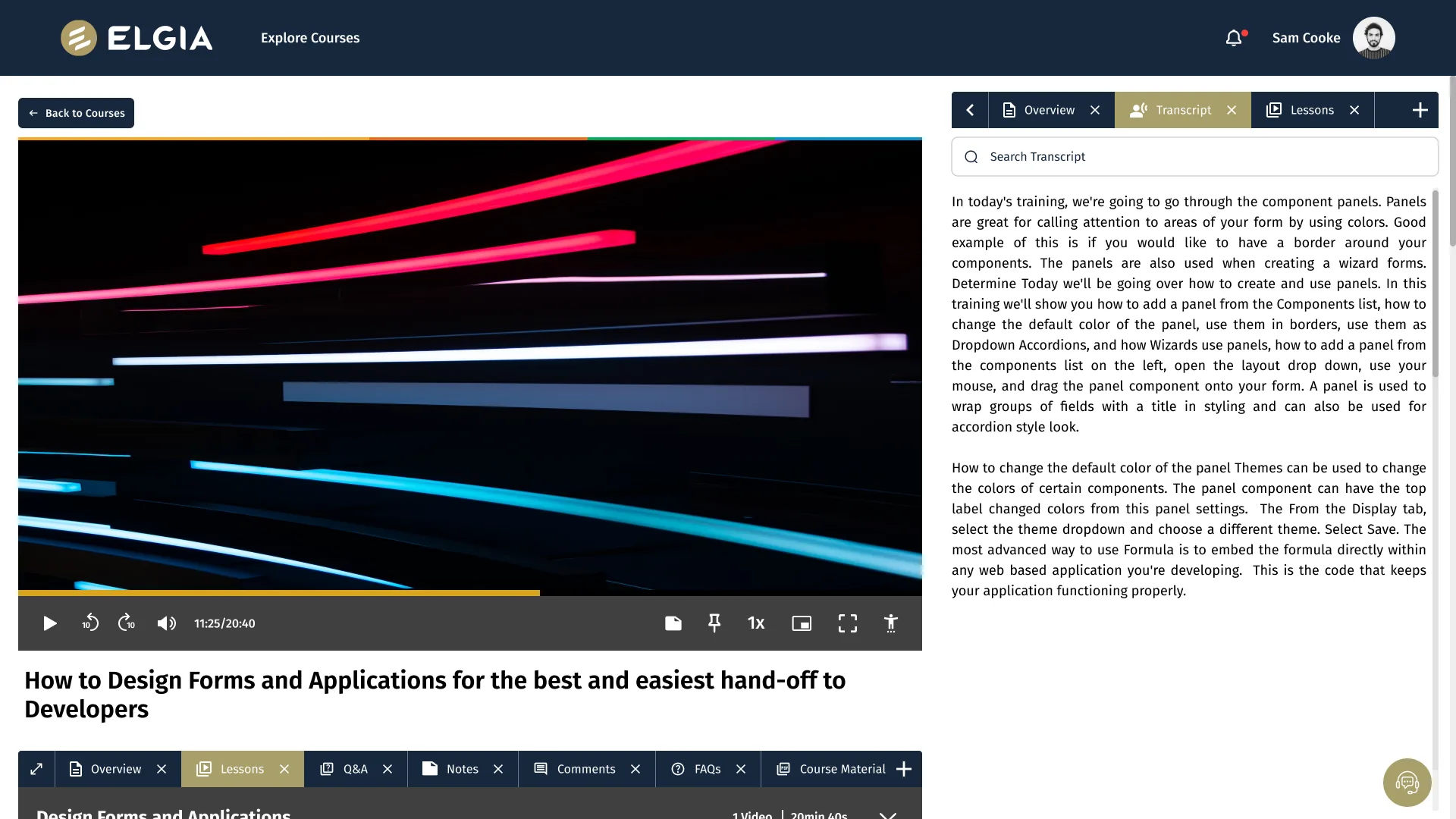
The course player: a lesson video with note, pin and speed controls in the player bar, and the transcript open in a side panel with a search field
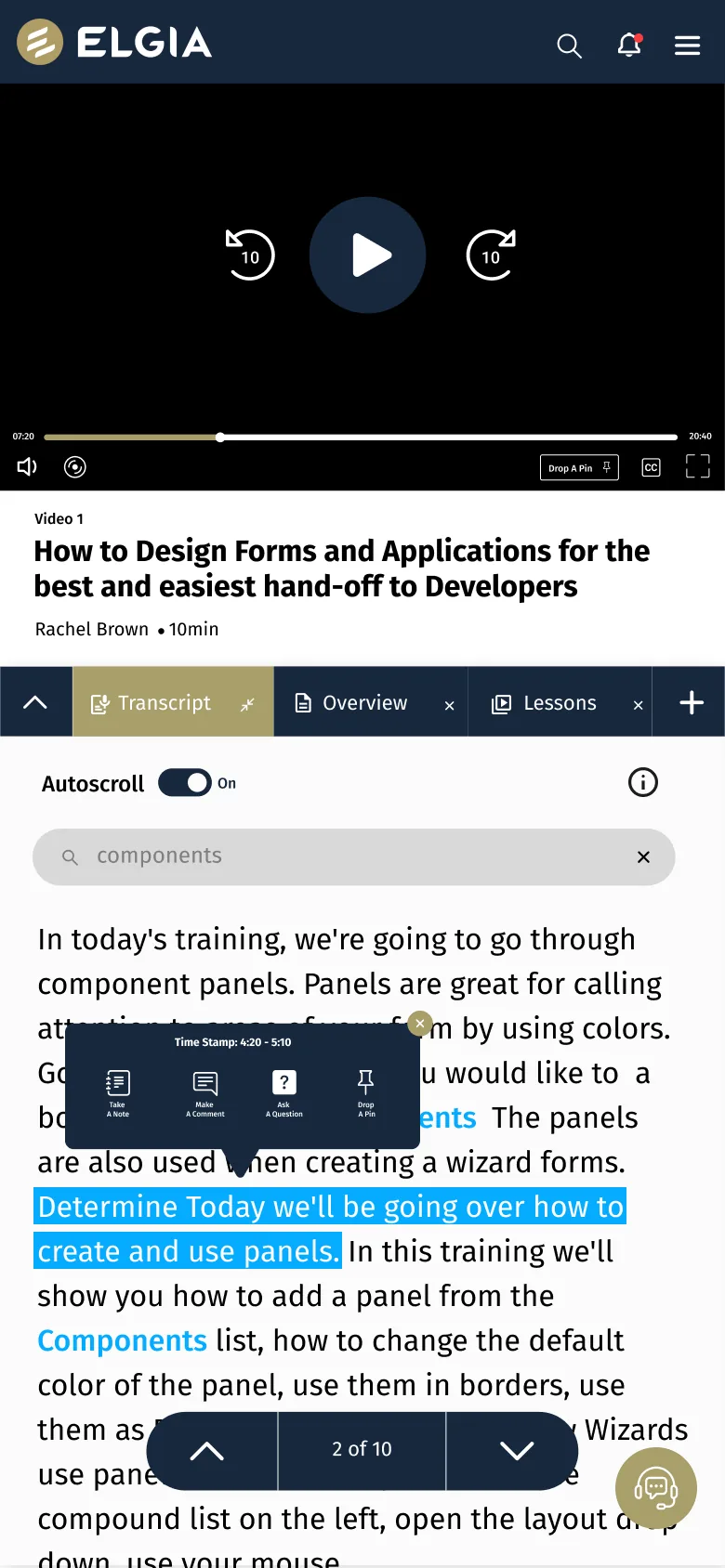
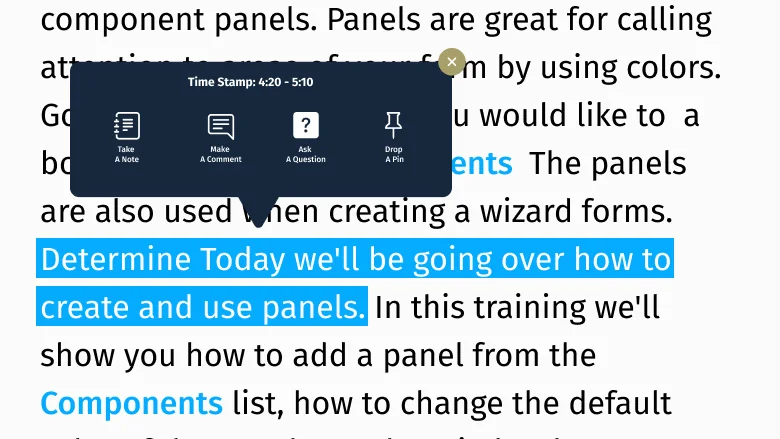
The same lesson on a phone: the transcript searched for 'components', a passage selected and a menu to take a note, comment, ask a question or drop a pin at 4:20 to 5:10
THE COURSE PLAYER ON DESKTOP AND MOBILE · ALL LEARNERS AND INSTRUCTORS FICTIONAL
Overview

Alinkeo is a learning platform: courses built from video lessons, made to get knowledge to a specific group of people: military veterans. Authors upload a video and get a transcript with it, from human transcription or speech recognition. As senior designer, working with junior designer Mutala Musau, I designed the course player learners study in and the tools inside it.

Problem

Lessons are long videos. A video is hard to search, hard to skim and hard to come back to, and the questions a learner has are about one moment in it, not the whole lesson.

Outcome

A course player built around the transcript: search it, jump from any line, and attach a note, comment, question or pin to the exact moment it's about.
4ways to mark a moment: note, comment, question, pin
2sides to the product: learners in the player, authors in the editor
1transcript that every tool anchors to

The challenge
a video is hard to come back to

A lesson can run past 20 minutes. Learners want to find the part where a term came up, keep a thought for later, or ask about the bit they didn't follow.

In a plain video player all of that happens somewhere else: a notebook, a forum, or scrubbing back and forth along the timeline. The work was to bring it into the player and tie it to the moment it's about.

Two passes
from tabs to a reading panel

The first pass put every tool in the side panel's tabs, with small text buttons in the player bar: Display Feedback Type and Drop A Pin.

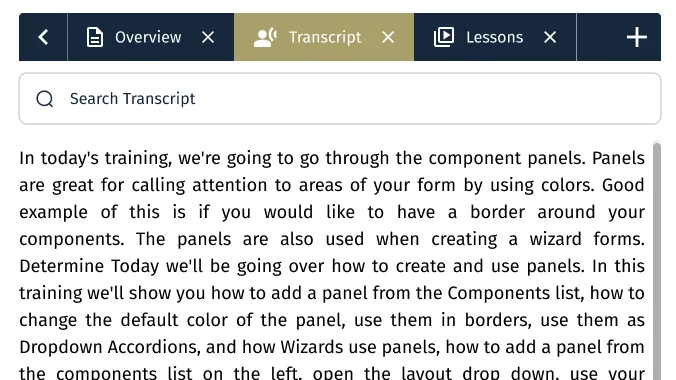
The refined player gives the transcript room to be read. The side panel opens on it with search at the top, and note and pin sit in the player bar as icons beside speed, picture-in-picture and accessibility.

Before · first pass
First pass: a lesson video with text buttons in the player bar, and a side panel of five small tabs showing the course's lessons
Five small tabs in the side panel, eight more under the video, and tools as text buttons.
After · the refined player
Refined player: note and pin icons in the player bar, and the side panel open on a searchable transcript
The transcript in its own readable panel, with note and pin one tap away in the player bar.

Try it
mark a moment

A working stand-in for the player. Search the transcript, click any line to jump there, then take a note, comment, ask a question or drop a pin on it. Everything you save takes you back to its moment.

Lesson 1 · Panels in your forms

In today's training, we're going to go through the component panels.

00:00 / 20:40
Your moments2
    A stand-in for the real transcript panel. Lines follow the lesson in the screens.

    The design
    three decisions

    Each one moves something learners did outside the video into the player, and ties it to a time in the lesson.

    Detail: the side panel open on the transcript, with a Search Transcript field above it

    The transcript is the way in

    CHOSE
    A searchable transcript beside the video, where any line jumps the video to that moment.
    INSTEAD OF
    The timeline as the only way to find a part of the lesson.
    WHY
    Words are faster to scan than a scrubber. Search finds every mention of a term and steps through them, "2 of 10".
    Detail on mobile: a selected passage and a menu stamped 4:20 to 5:10 with Take a note, Make a comment, Ask a question and Drop a pin

    Mark the moment, not the video

    CHOSE
    Select a passage and attach a note, comment, question or pin to its time stamp, such as 4:20 to 5:10.
    INSTEAD OF
    Notes and comments about the lesson as a whole.
    WHY
    Anything a learner saves can take them back to the second it's about. One menu, four choices, wherever the passage is.
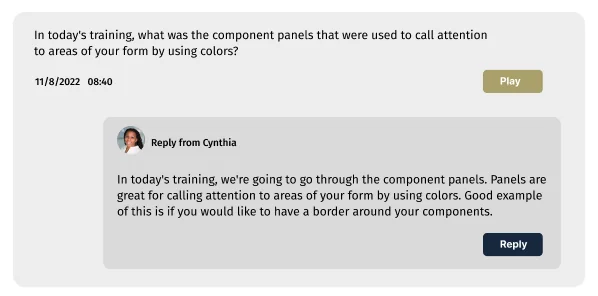
    Detail: a learner's question with a date, a time and a Play button, and the instructor's reply beneath it

    Questions keep their moment

    CHOSE
    Q&A threads tied to a time in the lesson, with Play to rewatch it and the instructor's replies underneath.
    INSTEAD OF
    A general comments list under the course.
    WHY
    The instructor answering sees exactly what was asked about, and the next learner stuck on the same part finds the answer there.

    The model
    one line, many layers

    Every tool in the player hangs off the same thing: a time range in the transcript. That's what lets a note, a question or a pin take you back.

    01 · TranscriptWhat was saidGenerated with the video, by human transcription or speech recognition
    02 · MomentWhen it was saidA passage and its time stamp, such as 4:20 to 5:10
    03 · LayerWhat you addA note, comment, question or pin, each one a way back to the moment

    For course authors
    the same transcript, cut into clips

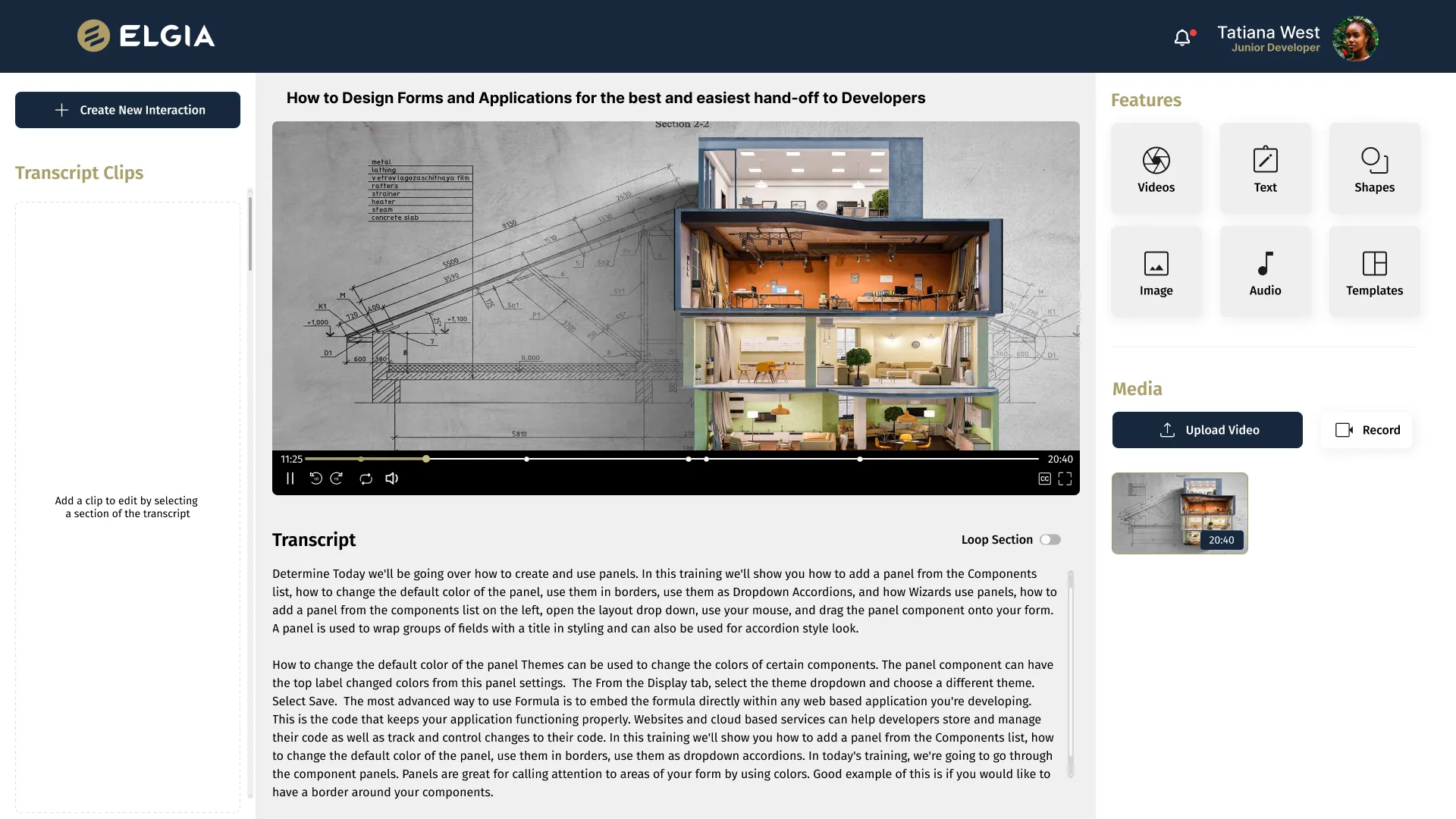
    Authors upload a video or record one. In the editor, they select part of the transcript to make a clip, loop a section while they work on it, and add interactions along the timeline.

    The transcript learners read is the one authors edit with, so a moment means the same thing on both sides.

    The editor: transcript clips on the left, the video with interaction markers on its timeline and the transcript with a Loop Section switch in the middle, and features and media on the right
    Transcript clips on the left, the video and its transcript in the middle, features and media on the right.

    A lesson
    start to finish

    Follow a learner through one lesson: watch with the transcript, pin a moment, and find what they saved.

    The course player with the transcript open beside the video
    01Watch and readThe transcript runs beside the video, with search at the top.
    ALL LEARNERS AND INSTRUCTORS FICTIONAL

    Outcome
    what changed

    Next time
    what I'd do differently

    Measure which tools get used

    Four ways to mark a moment is a lot. Usage per tool would show which ones earn a place up front and which can sit a tap further away.

    Open with fewer tabs

    The refined player still opens with ten tabs across the side panel and below the video. I'd start with Transcript and Lessons and let learners add the rest with the + button.

    Next project · 06 · NDATrading simulator →